Showing posts with label translation. Show all posts
Showing posts with label translation. Show all posts
Thursday, March 20, 2008
Tools for Translation and Language Detection
New Google AJAX Language API - This API helps developers automatically translate content in their applications. Users on these sites will have an easier time communicating across lingual boundaries. The Language API provides both translation and language detection. See examples of the translation tools in action.


Saturday, March 15, 2008
Universal or Neutral Spanish Verses Regional Spanish
Some companies, like Microsoft, preface Spanish manuals with a note that explains to the user that the document was written in universal Spanish that all of their customers could understand. Read Microsoft's standard disclaimer (in Spanish).
Carefully choosing Spanish words so that the resulting text is “Neutral” or “Universal” is acceptable (i.e. not identifiable as written for another regional market) throughout the Spanish-speaking world. It is also a significant technique for reducing localization costs by eliminating the need to produce additional versions for each Spanish-speaking country.
Not everybody will be convinced that a universal Spanish is appropriate. However, we need to adapt to business realities. It is no longer feasible - or necessary - to write specifically in the Spanish of your Spanish target audience.
Proponents of country-specific Spanish Web sites often cite differing conventions for depicting times, numbers, and the like. For example, while a Mexican might write a check for $3,290.67, a Spaniard would write the same amount as $3.290,67. Insisting on an entire different Web site to account for differences like this example is rather like missing the forest for the trees. While a notation might be unconventional, it surely would not result in any confusion.
Carefully choosing Spanish words so that the resulting text is “Neutral” or “Universal” is acceptable (i.e. not identifiable as written for another regional market) throughout the Spanish-speaking world. It is also a significant technique for reducing localization costs by eliminating the need to produce additional versions for each Spanish-speaking country.
Not everybody will be convinced that a universal Spanish is appropriate. However, we need to adapt to business realities. It is no longer feasible - or necessary - to write specifically in the Spanish of your Spanish target audience.
Proponents of country-specific Spanish Web sites often cite differing conventions for depicting times, numbers, and the like. For example, while a Mexican might write a check for $3,290.67, a Spaniard would write the same amount as $3.290,67. Insisting on an entire different Web site to account for differences like this example is rather like missing the forest for the trees. While a notation might be unconventional, it surely would not result in any confusion.
Wednesday, March 12, 2008
English is THE Second Language
Newsweek International has published an article on the rise of English around the world. English instruction is a billion-dollar business and growing. But what’s most fascinating is that non-native English speakers now outnumber native English speakers.
Check out these article excerpts:
Within a decade, 2 billion people will be studying English and about half the world—some 3 billion people—will speak it, according to a recent report from the British Council.
Check out these article excerpts:
Within a decade, 2 billion people will be studying English and about half the world—some 3 billion people—will speak it, according to a recent report from the British Council.
Non-native speakers of English now outnumber native speakers 3 to 1, according to English-language expert David Crystal, whose numerous books include “English as a Global Language.” “There’s never before been a language that’s been spoken by more people as a second than a first,” he says. In Asia alone, the number of English-users has topped 350 million—roughly the combined populations of the United States, Britain and Canada. There are more Chinese children studying English—about 100 million—than there are Britons.
Does this mean that companies don’t need to translate their Web sites? Not exactly.
Every study I have read about the purchasing habits of non-native English speakers says that people prefer to purchase goods in their native language. That doesn’t mean they won’t purchase in another language, just that they’re more likely to purchase in their native language. Which is why we’re witnessing a rush of US companies creating Spanish-language Web sites for the US market.
Tuesday, March 4, 2008
Internationalization (I18n) - Character encodings for beginners
Question
What is a character encoding, and why should I care?
Answer
First, why should I care?
If you use anything other than the most basic letters and numbers of the English alphabet, people may not be able to read your text unless you say what character encoding you used.
For example, you may intend the text to look like this:
There can be further complications beyond those described in the panel above (such as byte order and escape sequences), but the detail described there shows why it is important that the application you are working with knows which character encoding is appropriate for your data, and knows how to handle that encoding.
Most of the time, however, you will not need to know the details. You will just need to be sure that you consider the advice in the section How does this affect me? below.
How do fonts fit into this?
A font is a collection of glyphs (definitions of shapes) used to display characters.
Once your application has worked out what characters it is dealing with, it will then look in the font for glyphs in order to display or print those characters. (Of course, if the encoding information was wrong, it will be looking up glyphs for the wrong characters.)
A given font will usually cover a single character set, or in the case of a large character set like Unicode, just a subset of all the characters in the set. If your font doesn't have a glyph for a particular character, some applications will look for the missing character in other fonts on your system (which will mean that the glyph will look different from the surrounding text, like a ransom note). Otherwise you will typically see a square box, a question mark or some other character instead. For example:
How does this affect me?
As a content author or developer, you need to choose the best character encoding for your content or data. Unicode encodings are often a good choice here, since you can use a single encoding to handle pretty much any character you are likely to meet. This greatly simplifies things. Using Unicode throughout your system also removes the need to track and convert between various character encodings.
Content authors need to check what encoding their editor or scripts are saving text in, and how to save text in the encoding of your choice. Note, however, that just declaring a different encoding won't change the bytes; you need to save the text in that encoding too.
Content authors also need to find out how to declare the character encoding used for the document format they are working with. You may also need to check that your server is serving documents with the right HTTP declarations. Developers need to ensure that the various parts of the system can communicate with each other, understand which character encodings are being used, and support all the necessary encodings and characters.
What is a character encoding, and why should I care?
Answer
First, why should I care?
If you use anything other than the most basic letters and numbers of the English alphabet, people may not be able to read your text unless you say what character encoding you used.
For example, you may intend the text to look like this:
 but it may actually display like this:
 Not only does inadequate encoding information spoil the readability of displayed text, but it may mean that your data cannot be found by a search, or reliably processed in a number of other ways.
So what's a character encoding?
Words and sentences in text are created from characters. Examples of characters include the Latin letter á or the Chinese ideograph 請 or the Devanagari character ह.
You may not be able to see some of the characters in this page because you don't have the necessary fonts. If you click on the place where you expected to see a character you will link to a graphic version. This page is encoded in UTF-8. Characters are grouped into a character set (also called a repertoire). This is then called a coded character set when each character is assigned a particular number, called a codepoint. These codepoints will be represented in the computer by one or more bytes. Basically, this means that all characters are stored in computers using a code, like the ciphers used in espionage. A character encoding is a key to unlock (ie. crack) the code. It is a set of mappings between the bytes representing numbers in the computer and characters in the coded character set. Without the key, the data looks like garbage.
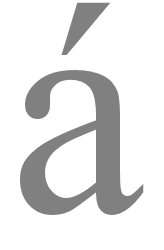


The misleading term charset is often used to refer to what are in reality character encodings. You should be aware of this usage, but stick to using the term character encodings whenever you can. Unfortunately, there are many different character sets and character encodings, ie. many different ways of mapping between bytes, codepoints and characters. The following panel provides more detail for those who are interested.
For example, in the coded character set called ISO 8859-1 (also known as Latin1) the codepoint value for the letter é is 233. In ISO 8859-5, the same codepoint represents the Cyrillic character щ. These character sets contain fewer than 256 characters and map codepoints to byte values directly. So a codepoint with the value 233 is represented by a single byte with a value of 233. Note however that that byte may represent either é or щ, depending on the context. Other coded character sets use a different approach. For example, with the Unicode character set, you can represent both characters in the same set. In fact, Unicode contains, in a single set, most characters you are likely to ever need. While the value of 233 still represents the é, the Cyrillic character щ now has a codepoint value of 1097. This is too large a number to be represented by a single byte*. If you use the character encoding for Unicode text called UTF-8, щ will be represented by two bytes, but the codepoint value is not simply derived from the value of the two bytes spliced together - some more complicated decoding is needed. Other Unicode characters map to one, three or four bytes in the UTF-8 encoding. UTF-8 is the most widely used way to represent Unicode text in web pages. But UTF-8 is only one of the possible ways of encoding Unicode characters. In other words, a single codepoint in the Unicode character set can actually be mapped to different byte sequences, depending on which encoding was used for the document. Unicode codepoints can be mapped to bytes using any one of the encodings called UTF-8, UTF-16 or UTF-32. The Devanagari character क, with codepoint 2325 (which is 915 in hexadecimal notation), will be represented by two bytes when using the UTF-16 encoding (09 15), three bytes with UTF-8 (E0 A4 95), or four bytes with UTF-32 (00 00 09 15). |



There can be further complications beyond those described in the panel above (such as byte order and escape sequences), but the detail described there shows why it is important that the application you are working with knows which character encoding is appropriate for your data, and knows how to handle that encoding.
Most of the time, however, you will not need to know the details. You will just need to be sure that you consider the advice in the section How does this affect me? below.
How do fonts fit into this?
A font is a collection of glyphs (definitions of shapes) used to display characters.
Once your application has worked out what characters it is dealing with, it will then look in the font for glyphs in order to display or print those characters. (Of course, if the encoding information was wrong, it will be looking up glyphs for the wrong characters.)
A given font will usually cover a single character set, or in the case of a large character set like Unicode, just a subset of all the characters in the set. If your font doesn't have a glyph for a particular character, some applications will look for the missing character in other fonts on your system (which will mean that the glyph will look different from the surrounding text, like a ransom note). Otherwise you will typically see a square box, a question mark or some other character instead. For example:
How does this affect me?
As a content author or developer, you need to choose the best character encoding for your content or data. Unicode encodings are often a good choice here, since you can use a single encoding to handle pretty much any character you are likely to meet. This greatly simplifies things. Using Unicode throughout your system also removes the need to track and convert between various character encodings.
Content authors need to check what encoding their editor or scripts are saving text in, and how to save text in the encoding of your choice. Note, however, that just declaring a different encoding won't change the bytes; you need to save the text in that encoding too.
Content authors also need to find out how to declare the character encoding used for the document format they are working with. You may also need to check that your server is serving documents with the right HTTP declarations. Developers need to ensure that the various parts of the system can communicate with each other, understand which character encodings are being used, and support all the necessary encodings and characters.
Wednesday, February 13, 2008
Intranet Translation Statistics
Based on the 2007 Global Intranet Strategies Survey by NetStrategy/JMC
The second annual Global Intranet Strategies Survey conducted from June through August 2007 revealed some starting facts about the true state of globalization behind the firewall. 78 organizations around the world participated, representing 45% headquartered in Europe, 43% in North America, 10% in Asia-Pacific and 2% in other parts of the world. Over half have more than 15,000 employees, including 8% with 50 to 100,000 employees and 13% with over 100,000 employees.
Single language is prevalent, translation is rudimentary
The study shows that although two thirds of the participating companies are present in many countries, they tend to have a single corporate language. Approximately 3 out of 5 say they are primarily a “single-language” organization and have “single-language” intranet.
Those who do deal in multi-language contexts struggle with translation issues. The translation process is largely a manual one, with few that using technologies such as integration of the translation process into the CMS or translation memory software solutions. The percentages below show the proportion of companies saying the tool or process either exists throughout or in some parts of their organization (figures based on the 72 out of 178 companies who translate intranet content):
Multi-lingual glossaries – 38%
Machine translation – 19%
Translation memory software - 10%
Integration of translation into the Content management system – 11%
Definition of a clear process among the people involved in translations – 31%
35% of the companies in the survey population have a globalization strategy, which was defined as “defining systems, procedures based on the whole organization, such as global teams, standardizing intranet-related processes across the organization, sharing resources across the organization.”
28% say they practice internationalization, defined as “creating models for templates, guidelines, content that can easily be adapted to local needs without needing to revise the model, such as menu structures, customization, navigation, meta data.”
Only 24% have localization strategies, defined as “procedures for adapting internationalized models to meet local needs, such as specific navigation, template adaptations, content strategies, language, etc.”
The second annual Global Intranet Strategies Survey conducted from June through August 2007 revealed some starting facts about the true state of globalization behind the firewall. 78 organizations around the world participated, representing 45% headquartered in Europe, 43% in North America, 10% in Asia-Pacific and 2% in other parts of the world. Over half have more than 15,000 employees, including 8% with 50 to 100,000 employees and 13% with over 100,000 employees.
Single language is prevalent, translation is rudimentary
The study shows that although two thirds of the participating companies are present in many countries, they tend to have a single corporate language. Approximately 3 out of 5 say they are primarily a “single-language” organization and have “single-language” intranet.
Those who do deal in multi-language contexts struggle with translation issues. The translation process is largely a manual one, with few that using technologies such as integration of the translation process into the CMS or translation memory software solutions. The percentages below show the proportion of companies saying the tool or process either exists throughout or in some parts of their organization (figures based on the 72 out of 178 companies who translate intranet content):
Multi-lingual glossaries – 38%
Machine translation – 19%
Translation memory software - 10%
Integration of translation into the Content management system – 11%
Definition of a clear process among the people involved in translations – 31%
35% of the companies in the survey population have a globalization strategy, which was defined as “defining systems, procedures based on the whole organization, such as global teams, standardizing intranet-related processes across the organization, sharing resources across the organization.”
28% say they practice internationalization, defined as “creating models for templates, guidelines, content that can easily be adapted to local needs without needing to revise the model, such as menu structures, customization, navigation, meta data.”
Only 24% have localization strategies, defined as “procedures for adapting internationalized models to meet local needs, such as specific navigation, template adaptations, content strategies, language, etc.”
Sunday, February 10, 2008
Authoring Techniques for XHTML & HTML Internationalization
This W3C document provides techniques, in outline form, for content authors working with XHTML, HTML and CSS.
Includes guidelines on language declaration, specifying primary language metadata, indicating the language of a link destination, bidirectional text
Includes guidelines on language declaration, specifying primary language metadata, indicating the language of a link destination, bidirectional text
Subscribe to:
Posts (Atom)